Every conversation about technology today seems to revolve around the same handful of terms — LLMs, Context window, Tokens, RAG, AI Agents, MCP, Memory. The field has moved so fast that many of us haven’t had time to catch up.
This guide is here to close that gap with clear, structured explanations that build logically from one idea to the next.
What Do We Mean by “AI” Today?
When someone says “AI” in 2026, they almost always mean Generative AI — models that produce new content rather than just classify or predict. But that term sits on top of several layers worth understanding.
The Stack: AI → ML → Deep Learning → Generative AI
Artificial Intelligence (AI) is the broad ambition: making machines do things that normally demand human intelligence — reasoning, recognizing patterns, understanding language, making decisions.
Machine Learning (ML) narrows the approach: instead of programming explicit rules, you feed the system enough examples and let it discover the pattern itself. A spam filter that gets smarter over time is ML in action.
Deep Learning is a subset of ML using multi-layered neural networks loosely inspired by the human brain. These “deep” networks — with millions or billions of learned parameters are remarkably good at finding complex patterns in images, audio, and text. They are the engine behind modern AI.
Generative AI emerges when deep learning models are trained not just to analyze data but to create it. Trained on massive volumes of text, code, images, audio and videos these systems learn to generate new content that follows learned patterns.
Large Language Models (LLMs)
At the centre of the current AI moment is Large Language Model. An LLM is a deep learning model trained on an enormous amount of data. Its job is surprisingly simple: predict the next token. When a model is trained on trillions of tokens and billions of parameters, you get something that can reason, write, code, and hold a long conversation across nearly any domain.
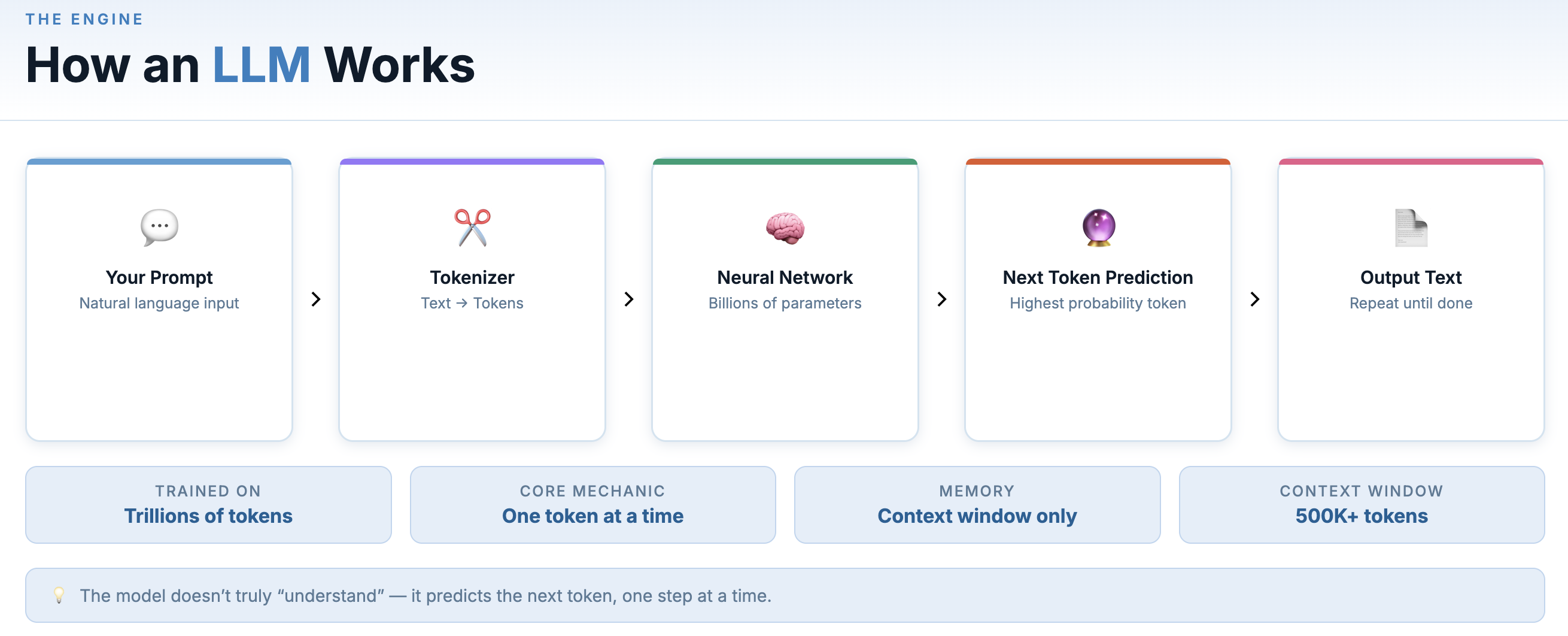
Token in this context is the fundamental unit an LLM works with. Instead of reading text as full sentences or even full words, most LLM break text into smaller pieces called tokens. A “token” is roughly a word or word fragment — “unbelievable” might be split into three tokens, “AI” is one. A token is simply a discrete unit of data that a model processes. Text tokens are the most familiar example, but other types (image, audio etc.) use their own equivalents.
At inference time (when you’re actually talking to it), the model takes your input and generates a response by predicting the most likely continuation, one token at a time.
GPT, Sonnet & Opus from Claude, Gemini and Llama are all large language models (LLMs), trained with different data, architectures, and design goals — which is why they have noticeably different strengths and behavior.
General-purpose models like GPT, Claude (including Sonnet and Opus), Gemini, and Grok are built for writing, research, reasoning, and multimodal tasks across text, images, and audio. Some models are specifically tuned for programming tasks. The Claude family of models also perform strongly on coding tasks, including generating, editing, and reasoning about source code across entire codebases.
Context Window: The Model’s Working Memory
Every LLM has a context window — a limit to how much text it can process in one go. Think of it as working memory. Context windows have expanded dramatically — from just a few thousand tokens in early models to hundreds of thousands, and in some cases over a million tokens today.
Think of it as a small notepad that can only hold a fixed number of lines. The model can read and respond to everything on the notepad, but once it fills up, older content falls off the edge and the model “forgets” it.
A larger context window lets you have longer conversations, analyze bigger documents, and give the model more background before acting. It’s one of the most important specs of any model.
RAG — Retrieval-Augmented Generation
LLMs have a fundamental limitation: their knowledge is frozen at a training cutoff. They don’t know what happened last month, and they definitely don’t know anything about your company’s internal documents, your customer database, or your codebase.
RAG (Retrieval-Augmented Generation) solves this by connecting an LLM to an external, queryable source of knowledge at inference time.
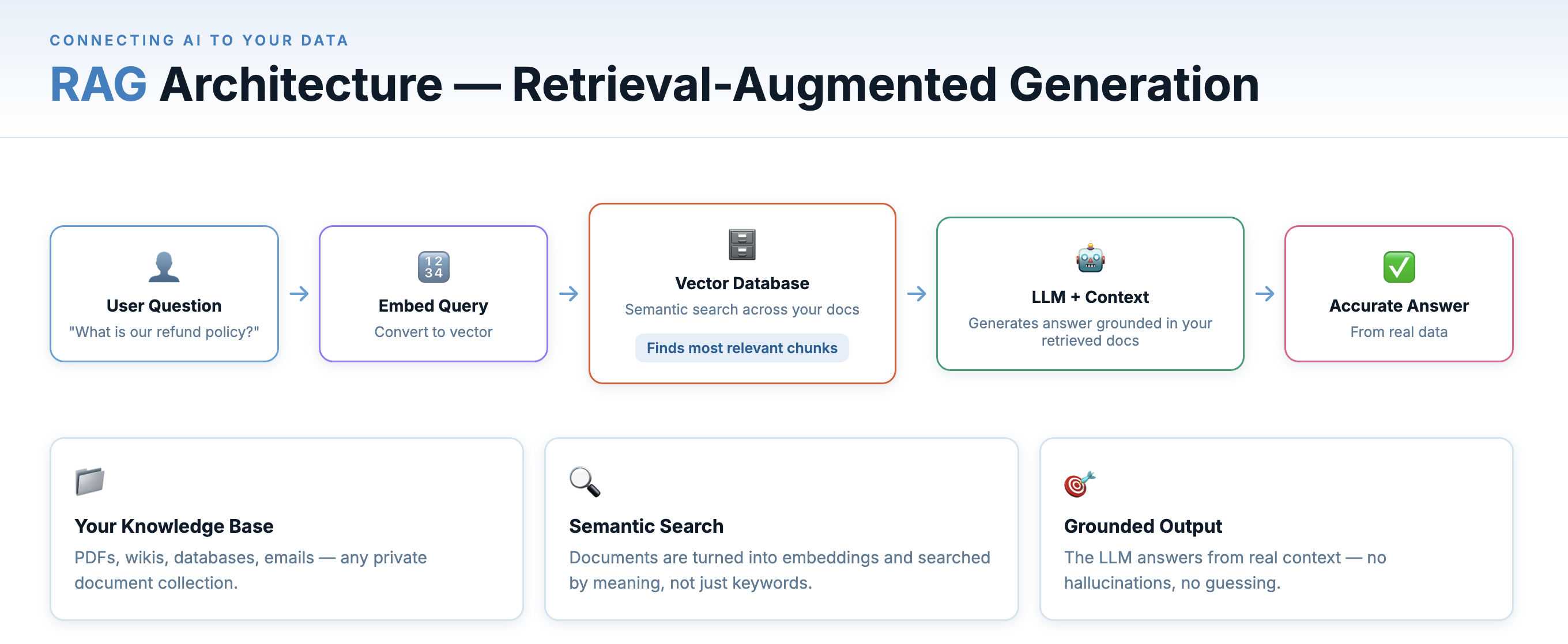
RAG connects your documents to an LLM via retrieval and grounding.
Here’s how it works:
- Your documents (PDFs, wikis, emails, code, etc.) are chunked into segments and converted into embeddings — numeric vectors that capture semantic meaning.
- These embeddings are stored in a vector database (Pinecone, Weaviate, pgvector, etc.).
- When a user asks a question, the question is also converted to an embedding, and the vector database finds the most semantically similar document chunks.
- Those chunks are injected into the LLM’s prompt as context — “Here’s relevant information from your documents; now answer this question.”
- The LLM responds, grounded in your real data rather than its training set.
- Your Documents — PDFs, wikis, databases, emails — your private knowledge base.
- Vector Search — Documents are converted to numeric embeddings and searched by semantic similarity.
- LLM Response — The model answers using the retrieved context, grounded in your real data.
This is why enterprise AI chatbots can accurately answer questions about your specific product — they’re not hallucinating or guessing; they’re reading from your documentation in real time. RAG is the architecture behind most real-world AI knowledge tools.
Here semantically similar means - Two pieces of text have a similar meaning even if they use different words.
Embeddings & Vector Databases
To make systems like RAG work, text needs a mathematical form — something machines can compute distance on. That’s what embeddings do. Embeddings are the mathematical foundation that makes semantic search possible. When you search “comfortable running shoes” and get results for “athletic footwear for long distances” — even though those words don’t match — you’re experiencing embeddings at work.
An embedding model takes a piece of text — a word, a sentence, a paragraph — and maps it to a high-dimensional vector of numbers. Texts with similar meaning produce vectors that are close together in that space, even if the words are completely different.
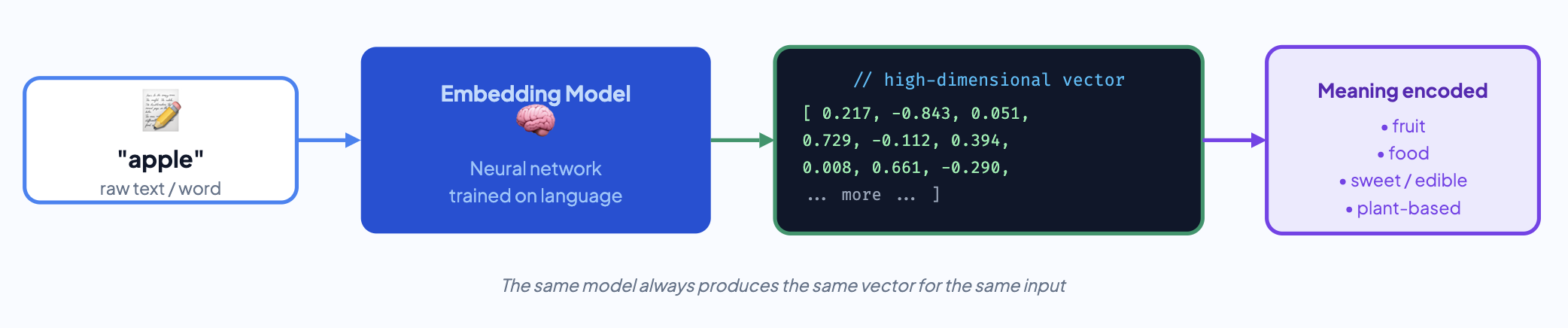
Vector databases (Pinecone, Weaviate, Qdrant, pgvector) store millions of these vectors and can find the nearest neighbors to a query vector in milliseconds. This is what enables semantic search — finding documents that are conceptually related to your query, not just lexically matching keywords.
This is just the gist of the concept. The topic deserves a deeper explanation of its own.
AI Agents — AI That Takes Action
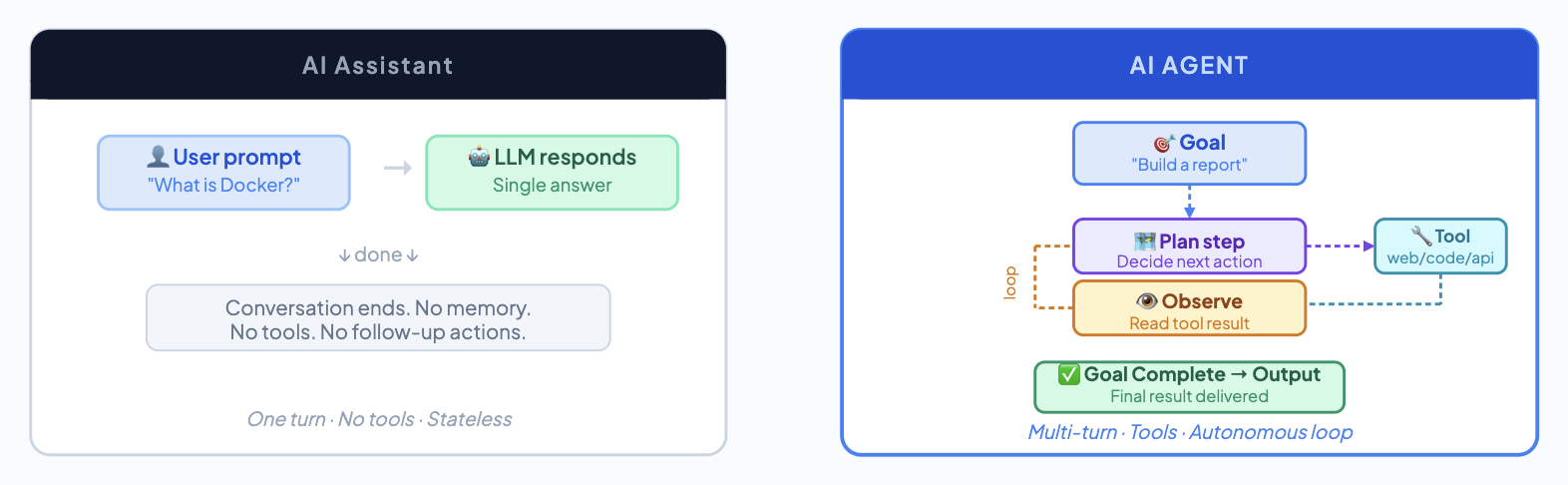
Asking an LLM model a question and getting an answer is a single-turn interaction. Useful, but limited. An AI agent is something more ambitious: a system that can plan a sequence of actions, use tools, respond to results, and iterate — all autonomously — to accomplish a complex goal.
Think of an agent as an LLM with a to-do list and the ability to act on it. A well-built agent can browse the web, query a database, run code, send emails, interact with APIs, read and write files — all in service of a goal you specified once at the start.
An AI agent in action You say: “Research the top 5 competitors of my product, pull their pricing from their websites, and produce a competitive analysis spreadsheet.” A capable agent would: search Google, visit each company’s pricing page, extract the relevant data, structure it into rows and columns, and write the file — without you touching anything in between.
The key insight is that agents operate in a loop: think → act → observe result → think → act again. Each action informs the next step. This iterative loop allows the system to adapt its behavior based on results which is different from a single-turn chat.
Multi-Agent Systems
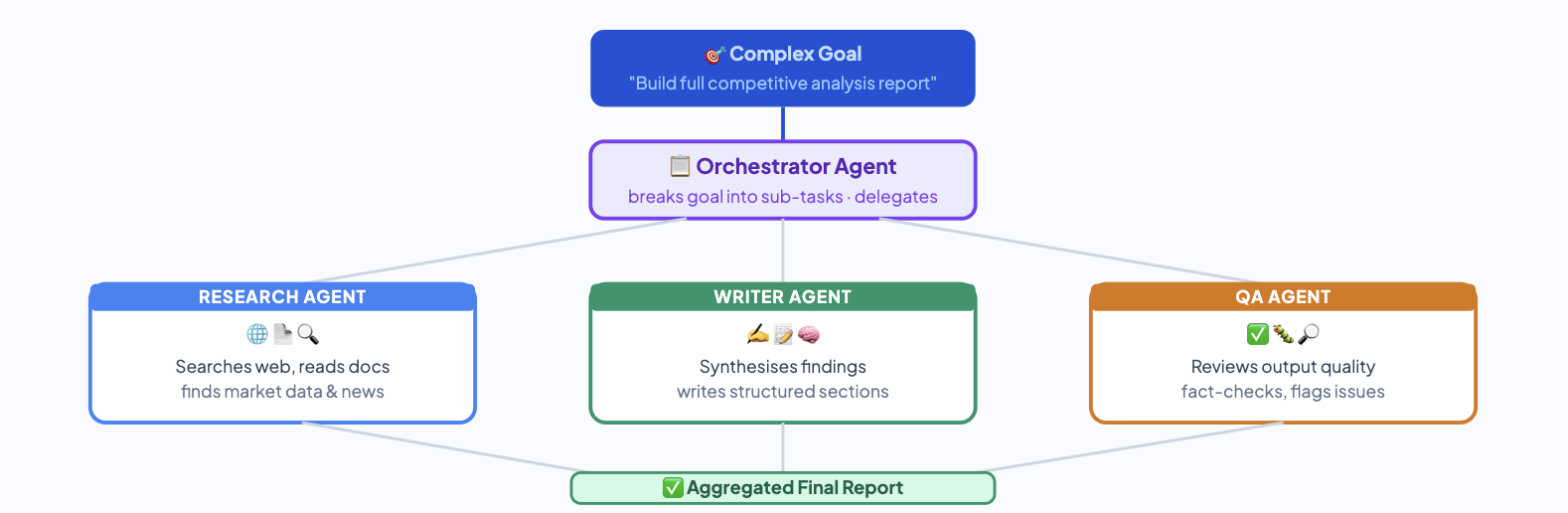
As tasks grow more complex, single agents begin to hit limits. Multi-agent architectures divide responsibilities across multiple agents: one agent plans and delegates, another writes code, another reviews outputs for quality. It mirrors how human teams work — specialized contributors collaborating on a shared goal, with coordination handled by an orchestrator that manages communication and task flow between agents.
Memory — How AI Remembers (and Forgets)
From the user’s perspective, every conversation with an LLM starts completely blank. The model has no memory of previous interactions. Start a new chat and the model has no recollection of anything you’ve ever said to it. This is most important architectural problems for to solve in AI landscape.
Understanding AI memory means understanding four distinct types, each with different properties and tradeoffs:
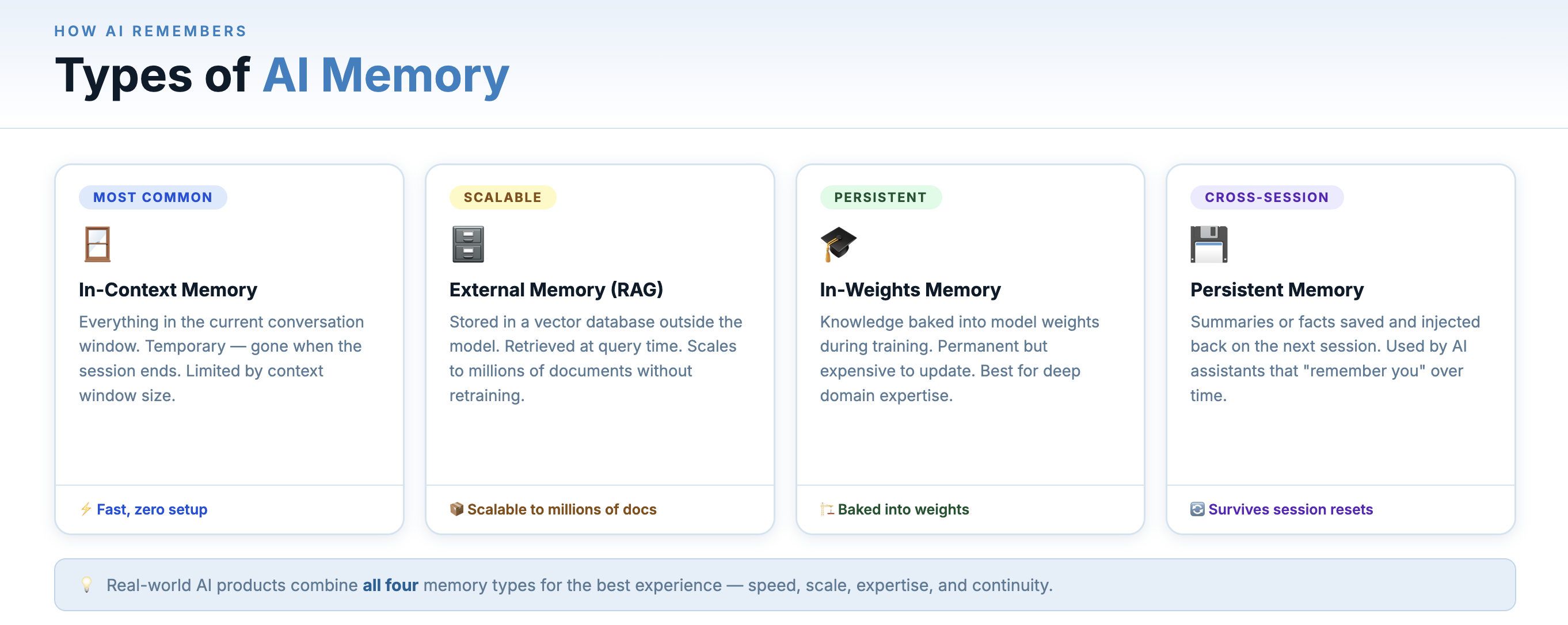
Memory is split across prompt context, external storage, training, and summaries.
1. In-Context Memory (Working Memory)
This is the context window — everything currently in the active conversation. The model appears to remember earlier messages because they are included again in the input prompt every time the model is called. The system keeps the conversation history and sends it back to the model with every new message. This is fast and immediate, but temporary: once the conversation ends or the context overflows, it’s gone.
Think of it like RAM — fast, large enough for one session, cleared when the power goes off.
2. External Memory (Long-Term Storage)
This is memory that lives outside the model — in a database, a file, a vector store. Before a conversation starts (or during it), relevant memories are retrieved and injected into the context. This is the same retrieval mechanism as RAG — retrieving relevant information from external storage and injecting it into the prompt. Thus RAG is one method for using external memory.
3. In-Weights Memory (Training)
When a model is trained or fine-tuned, the knowledge it learns is encoded directly into its parameters — its billions of weights. This is permanent, world-knowledge-level memory. The model “knows” how to form grammatically correct English sentences not because it looked it up, but because it learned it during training and that knowledge is baked into its structure.
This type of memory can’t be updated at runtime — it’s only changed through retraining or fine-tuning. It’s why models have a training cutoff date.
4. Episodic Memory (Summaries)
A practical middle ground is to avoid storing every message forever. Instead, the system stores a summarized or compressed representation of each conversation — capturing key decisions, user preferences etc. When a new session begins, the system retrieves these summaries and injects the relevant information into the model’s context so it can guide the response.
This approach is how many production AI assistants implement cross-session memory today, including features such as the memory capabilities in ChatGPT.
Why Memory Matters for Agents
For AI agents operating over long tasks or across multiple sessions, memory is not optional — it’s what separates a one-shot tool from a persistent collaborator. An agent without memory forgets everything between invocations. An agent with well-designed memory learns your preferences, avoids repeating mistakes, and builds context over time — more like working with a colleague than running a command.
The frontier challenge right now is memory management: deciding what to remember, what to summarize, what to forget, and how to keep stored memory accurate and relevant as things change.
MCP — Model Context Protocol
Every time developers wanted to give an AI assistant access to a new tool — a database, a file system, a browser, a third-party API — they had to build a custom integration from scratch. Every AI app had its own connection logic. It was fragile and exhausting to maintain.
Model Context Protocol (MCP) is Anthropic’s answer: an open standard that defines a universal interface for AI models to communicate with external tools and data sources. Think of it as the USB-C port for AI — a single, standardized connector that works with any compliant device.
A system like a database, email service, or SaaS application can expose an MCP server, which provides a standardized interface that AI agents can use to discover tools and perform actions. For developers building AI products, this is a major reduction in integration overhead.
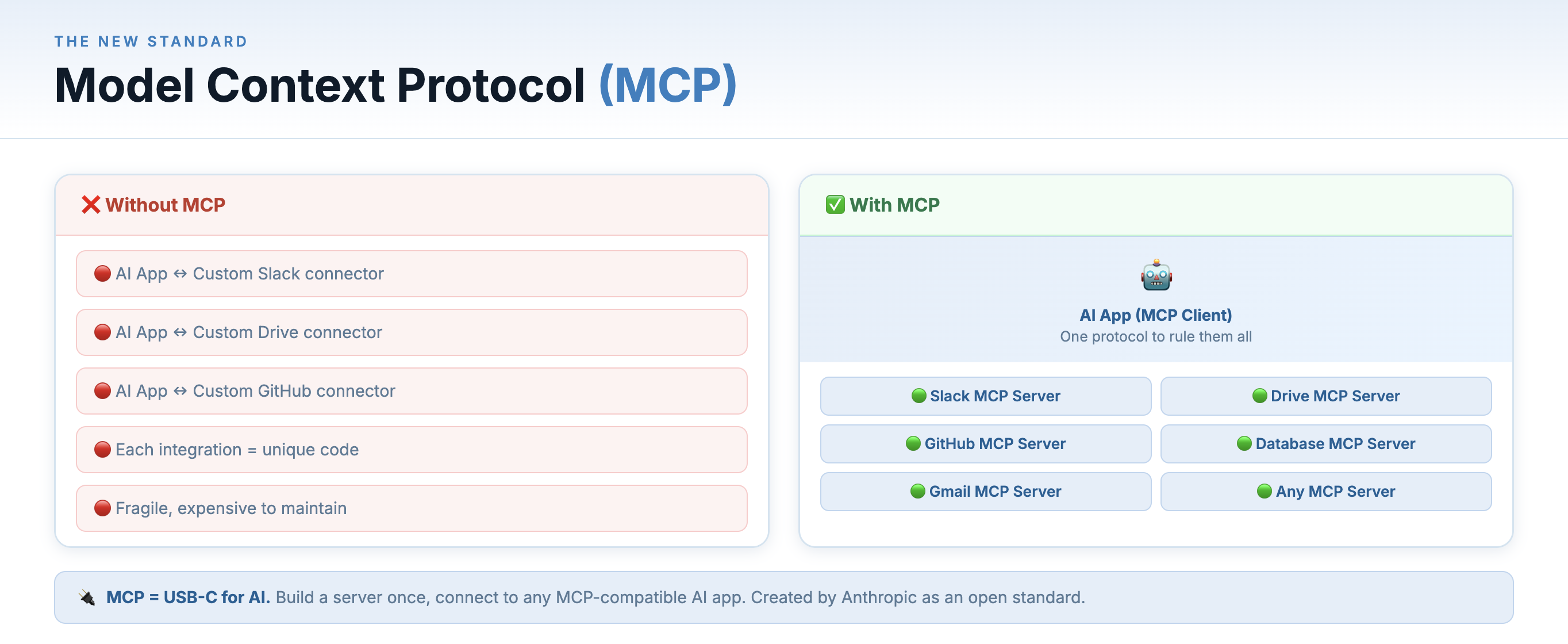
MCP acts like a universal connector — the “USB-C” of AI tool integrations
The architecture is simple:
- MCP Servers expose tools or data — a server might provide access to your file system, a PostgreSQL database, a web browser or a GitHub repo.
- MCP Clients are AI applications that connect to MCP servers to access those capabilities.
- Interoperability means any MCP-compatible client works with any MCP-compatible server, with no custom glue code.
MCP is open-source and already has a growing ecosystem of community-built servers. It’s quietly becoming the plumbing layer of the agentic AI world.
Key Terms at a Glance
- LLM — Large Language Model — the AI engine behind text generation tools.
- Prompt — The instruction or question you give the AI. Better prompts = better results.
- Token — The unit of text an LLM processes. Roughly a word or word fragment.
- Context Window — How much text the model can “see” and reason over at once.
- RAG — Retrieval-Augmented Generation — grounding AI responses in your own documents.
- AI Agent — AI that plans and takes autonomous actions over multiple steps to reach a goal.
- Memory — How AI systems store and retrieve information across turns, sessions, or time — from in-context (working memory) to external databases to in-weights knowledge.
- MCP — Model Context Protocol — a universal standard for connecting AI to external tools.
- Embedding — A numeric vector representation of text that captures semantic meaning.
- Fine-Tuning — Continuing to train a pre-trained model on your own specialized data.
The people who will thrive in the next decade of software and knowledge work are the ones who take the time to understand these tools, integrate them thoughtfully into their workflows, and keep learning as the technology evolves. You’ve made a solid start today.